Blogs


Welcome to Project Controls Institute, Australia blog.

Selection of thoughts and tips shared by Project Controls community.

test

How does Retained Logic, Progress Override and Actual Dates in Scheduling Options work?


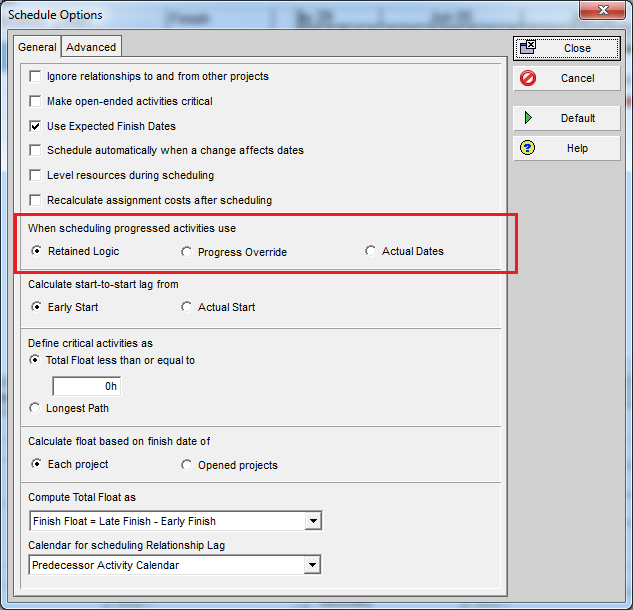
In P6 there are three options in the Scheduling Options dialog:

  • Retained Logic
  • Progress Override
  • Actual Dates

1

These three options control how P6 calculates “Out of Sequence Progress”.

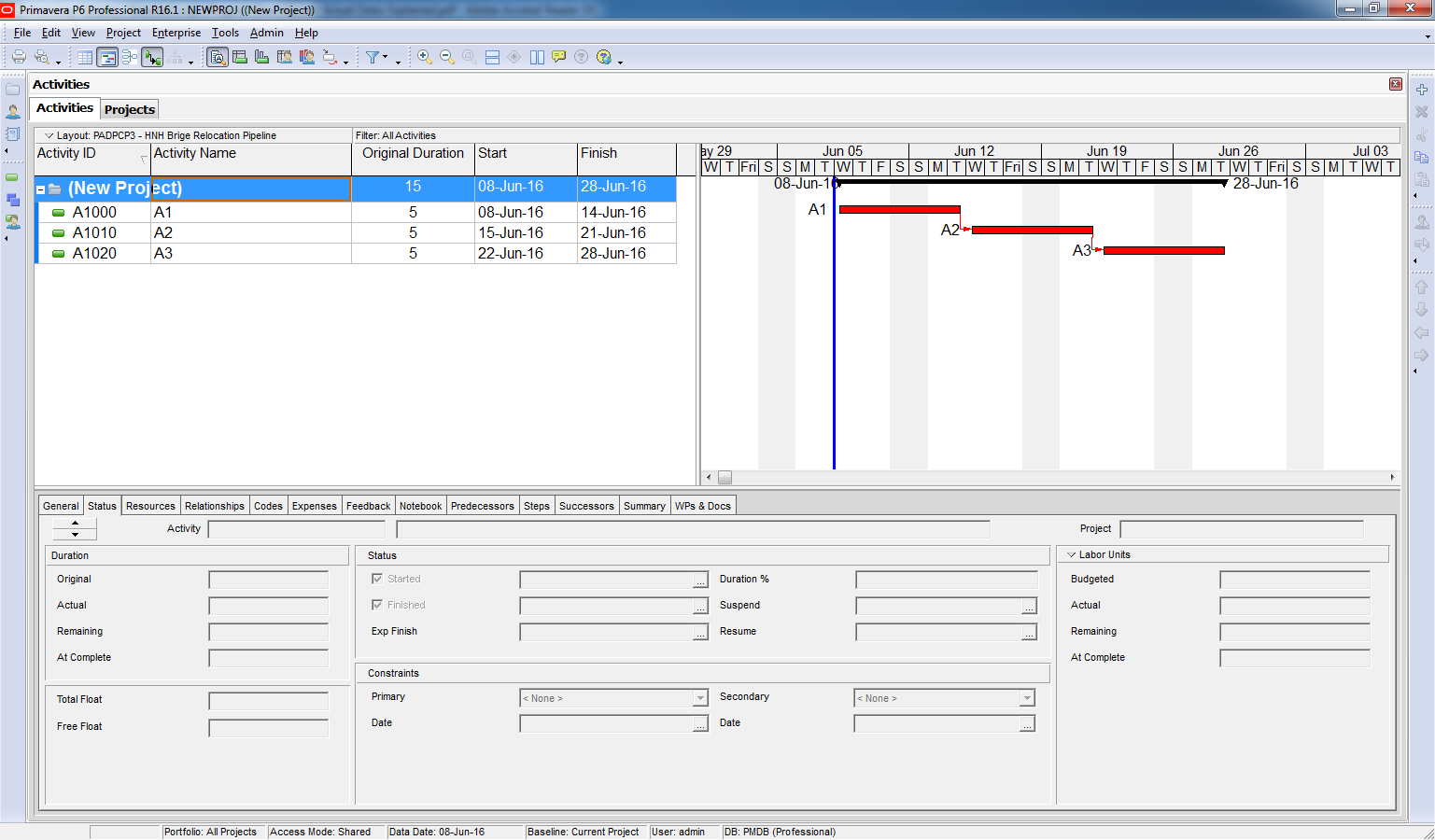
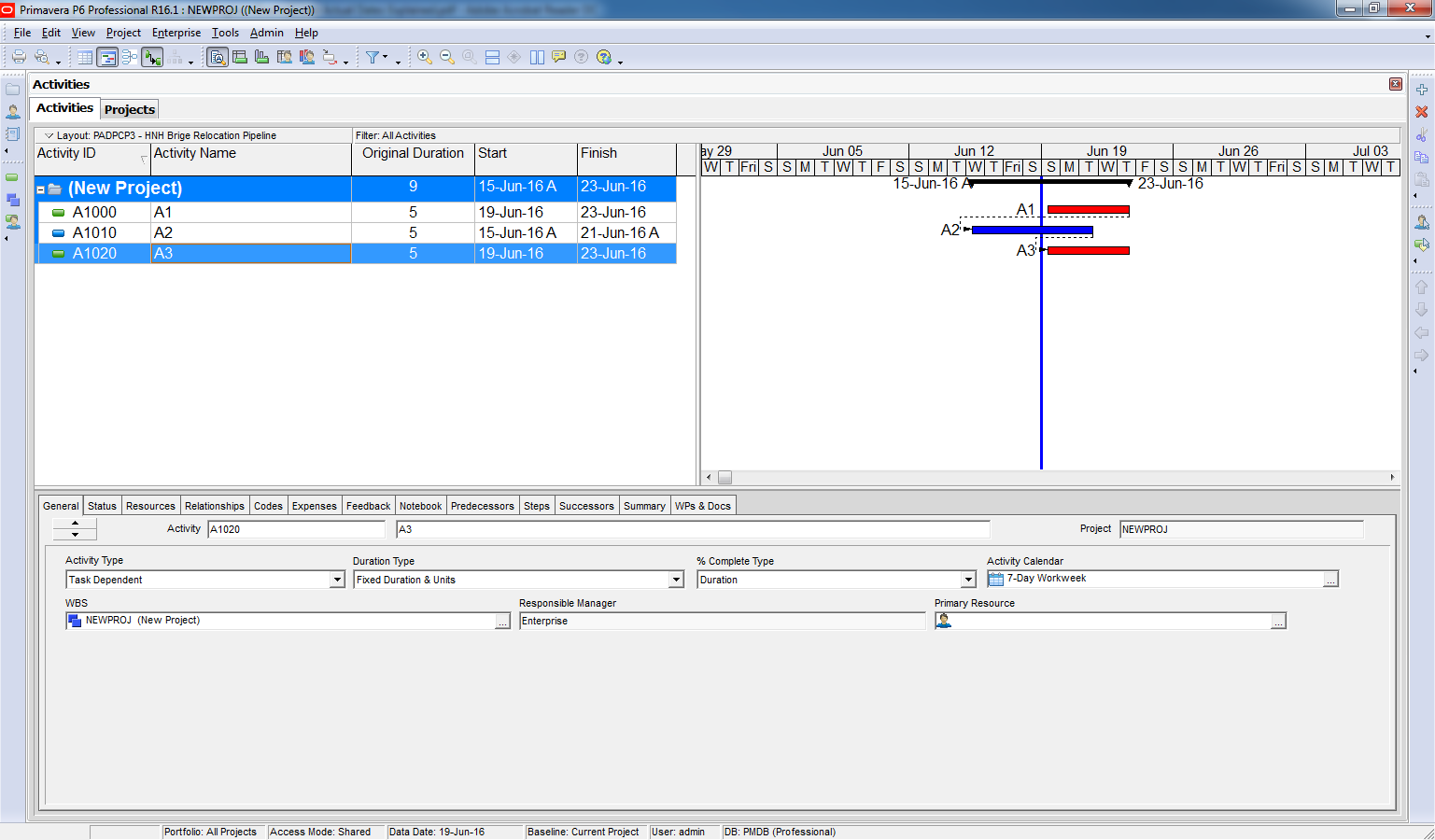
We have a simple project with 3 activities:

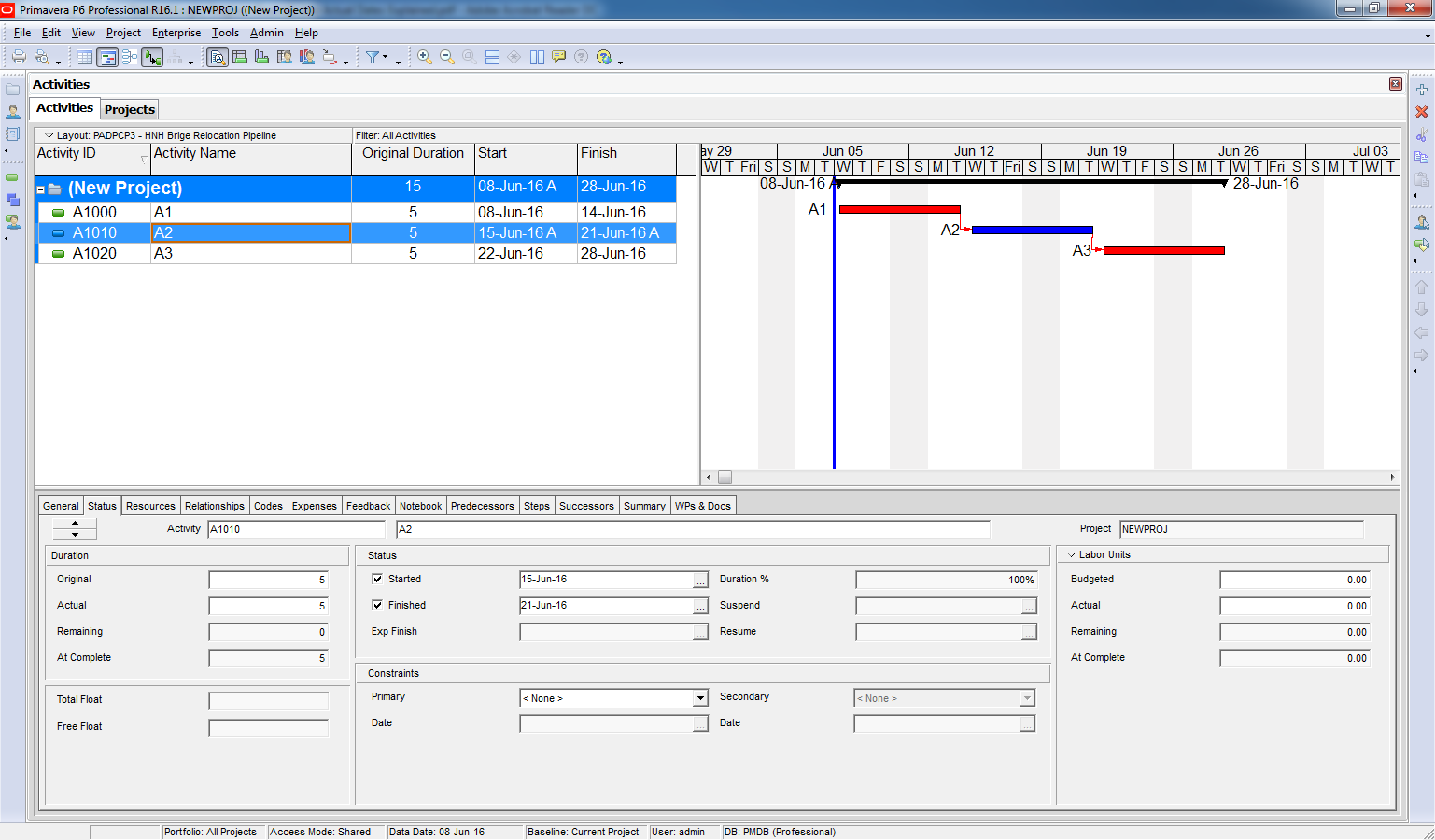
The activity logic dictates that A2 should not begin until A1 has been completed, but in the real world sometimes A2 can be started and finished even though A1 has not been started – this is known as Out of Sequence Progress.

So, how is P6 handle this case. It depend on which option you choose.

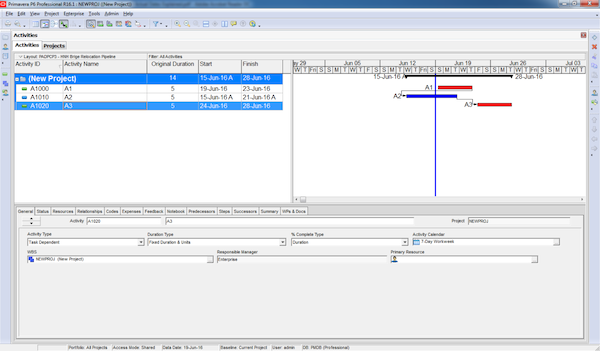
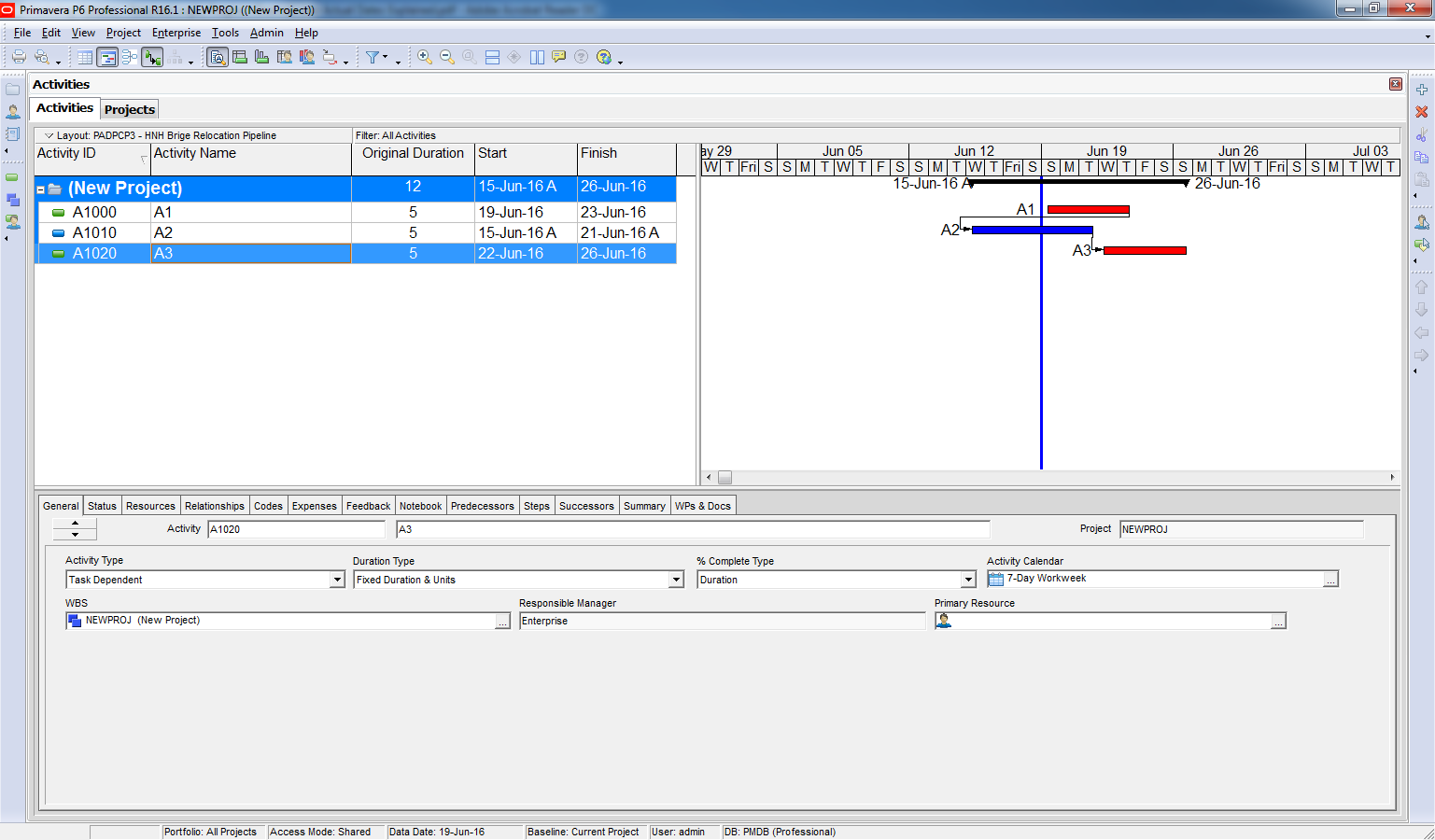
Scheduling using the Retained Logic option:

The logic of the activity is retained and enforced, and so Activity A3 cannot be started until activity A1 has been completed, as shown below.

Scheduling using the Progress Override option:

The out of sequence progress overrides the logic of the activity, and so activity A3 is scheduled independently of the predecessor of A2. In other words, activity A1 is no longer considered to be a predecessor of activity A3.

Scheduling using the Actual Dates option:

When scheduling the project using the Actual Dates option, the actual dates override the logic of the activity, and so activity A3 is scheduled to begin as soon as activity A2 is complete, even if activity A2 has an actual finish date after the data date.

So now I hope you know how to use those 3 options.

Continue reading
4540 Hits
0 comments

How much detailed is DETAIL Engineering?


 Building detailed design is not usually developed by the EPC Engineer, which merely defines its needs to the building construction contractor.

The EPC Engineering produces guide drawings, which will include:

   • Architectural drawings, showing all dimensions of the buildings, the dispositions of rooms, as defined by the concerned discipline (Mechanical for a building housing machinery, E&I for technical rooms etc),

  • Equipment dimensions and weight, for the design of supporting floors,

  • Equipment access requirements (size of doors, handling),

  • Building blast resistance requirement,

  • Cable entry requirements: raised/false floor, floor openings,

  • Climate requirements (temperature etc), and equipment heat dissipation,

  • Fire & Gas detectors and equipment layout,

  • Telecom equipment layout (LAN etc.),

  • Tie-in points for connection of the building to the PLANT’s utilities.

 The structural design, calculations and all structural drawings for the building and its foundation will be done to the civil contractor. So will the HVAC detailed design (equipment selection, flow diagram, ductwork routing), Fire & Gas and Telecom cable routing, design of the lighting and small power, plumbing networks, finishing schedules (doors etc.) etc.

The latter will particularly entail co-ordination all these trades, to avoid interferences.

The rationale for the EPC contractor to leave the building detail design to the construction contractor is that it has little cost impact and is time consuming. The EPC engineer’s always stretched resources concentrate on either critical or high cost items.

For On-shore Steel structures, such as pipe-racks etc, the EPC Engineer will perform the design, calculation and sizing of the members but no detail any further. Its work will stop at the issue of the Steel structure design drawings, such as the one shown on page 84. These are "on-line" drawings, indicating of the size of profiles, dimensions & elevations.

Connections between steel members, in particular, will not designed/sized by the EPC Engineer but left to the steel structure fabricator. The EPC contractor will simply provide the latter typical drawings, design criteria and individual loadings. The steel structure fabricator will perform the sizing of the connections and produce the corresponding calculations note and detailed drawings.

The fabricator will also produce all drawings used in fabrication (shop drawings) and erection. See samples shown on pages 85 and 86.

In Piping, the level of details to which the EPC Engineer goes is very high, with the issue of the Piping Isometric drawings. The latter are nevertheless not directly used for construction. Indeed, these are "Design" Isos, to which fabrication information (indication of welds following split in spools) must be added. Spooling, resulting in the issue of Shop Isos, is done by the piping construction contractor. Difference between Design and Shop isos are shown on page 114.

While leaving design work to the construction sub-contractors, the EPC Contractor must ascertain the latter’s design office resources and capability. Early follow-up of production of the latter (through put and quality) will allow early identification and mitigation of a bottleneck.

Continue reading
9592 Hits
0 comments

How to modify Activity ID Suffix in Primavera P6


7

In Primavera we can use ‘Renumbering Activity ID” function to modify Activity ID Prefix. How about we want to modify Suffix.

I will show you how.

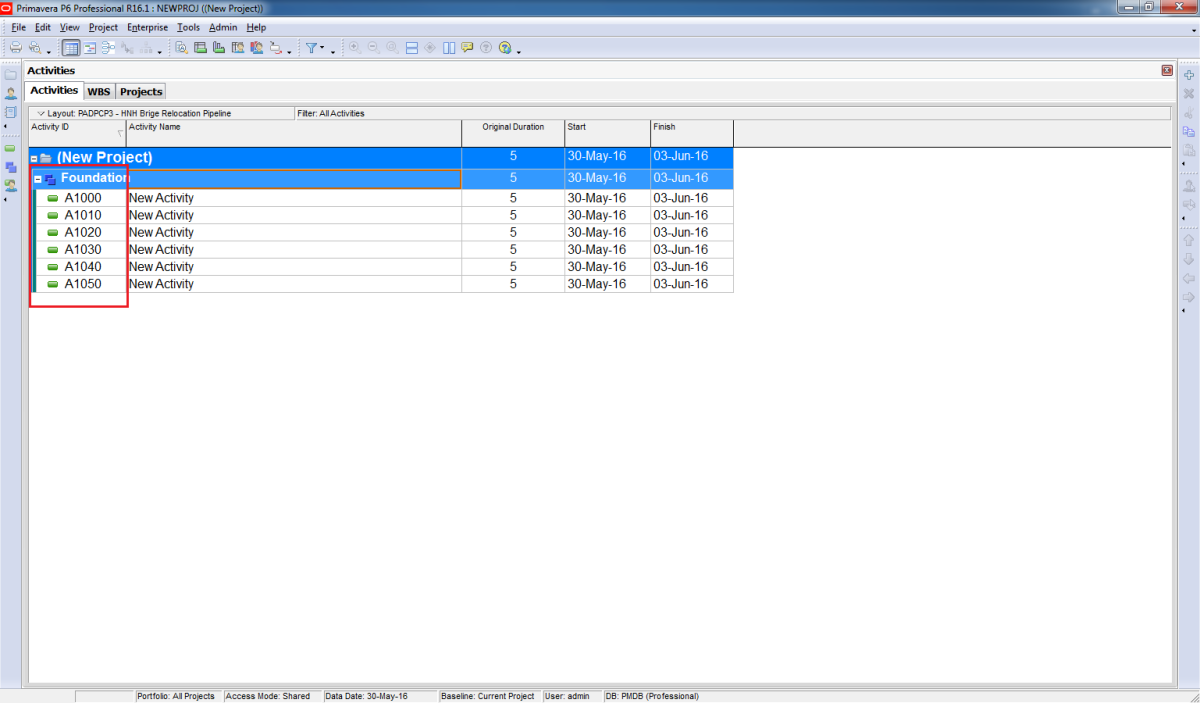
We have a simple project with default activity ID like this

1

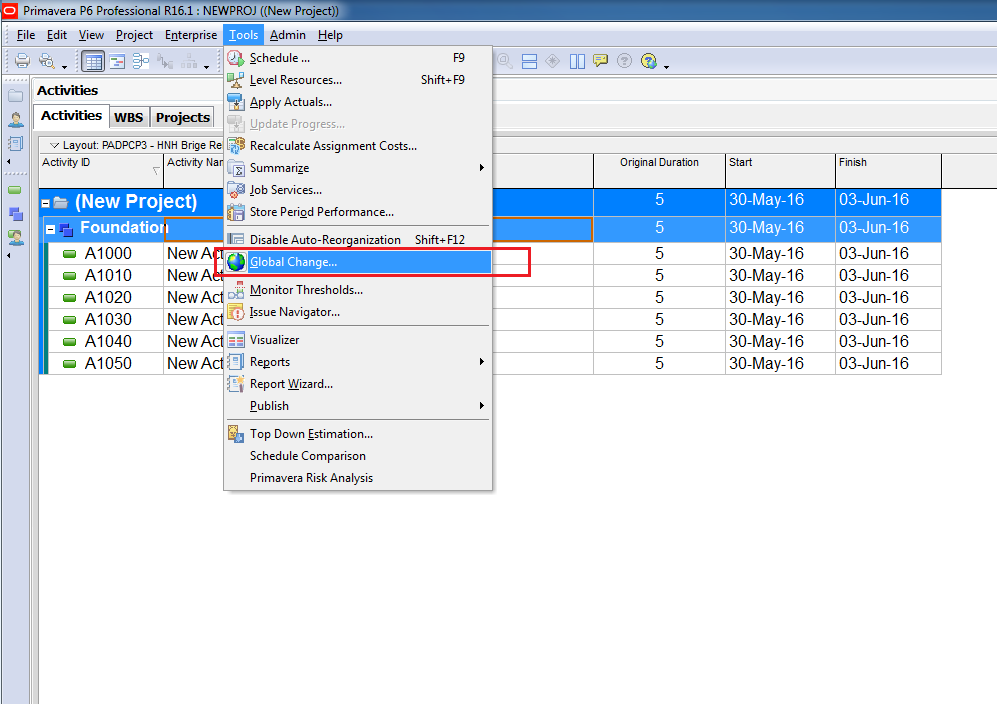
First we go to Tool -> Global Change

Click on New button

3

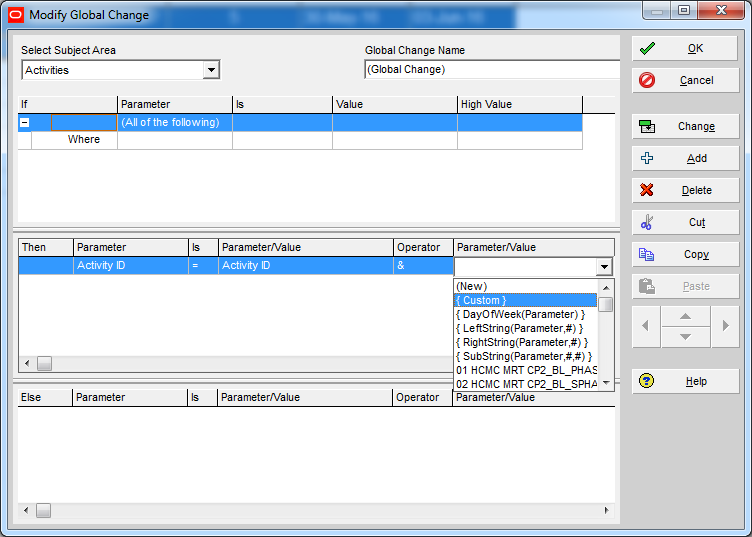
In “Then” section:

  • In Parameter select “Activity ID”
  • In Parameter/Value select “Activity ID”
  • In Operator select “&”
  • In Parameter/Value select “Custom”

3

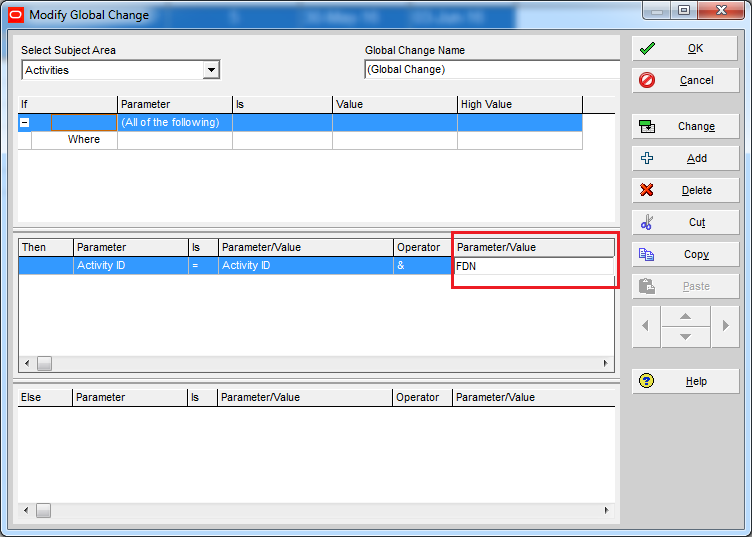
Then enter the Suffix you want to add. For example “FDN”

4

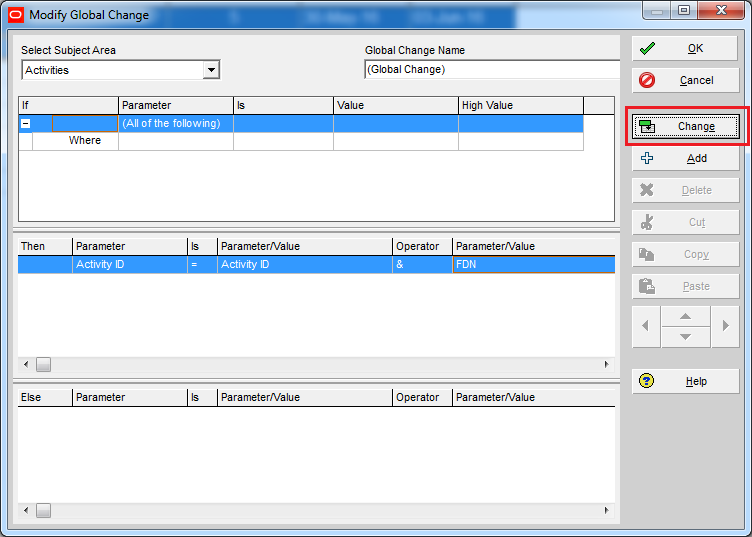
Click on “Change” button.

6

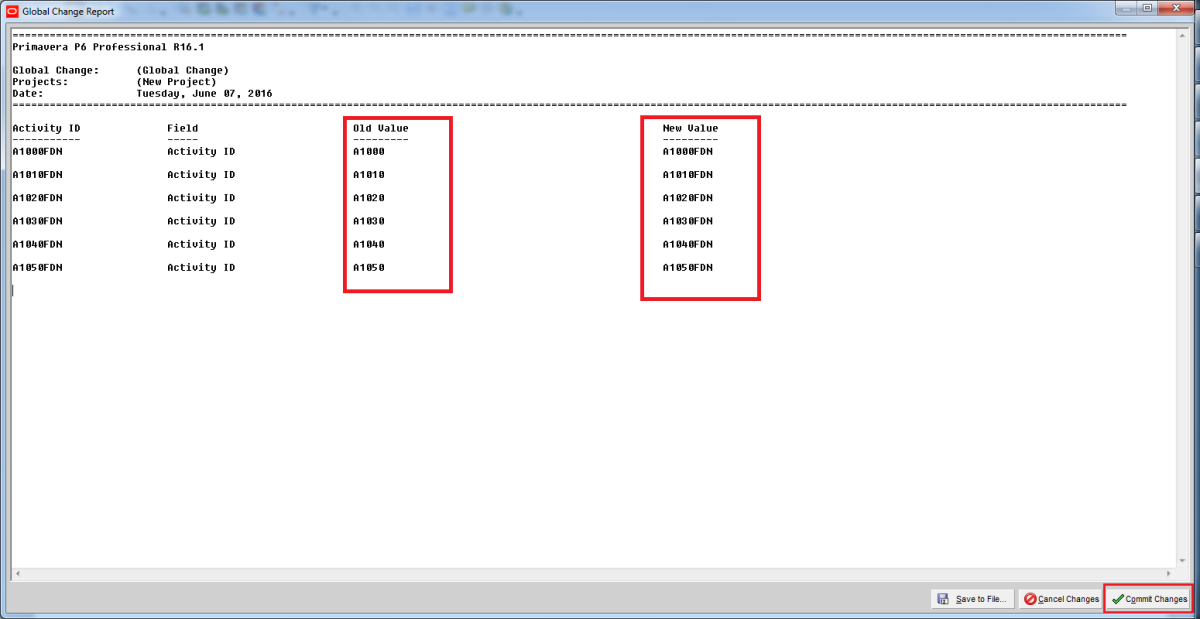
P6 will show you a preview of the change. Click on “Commit Changes” button.

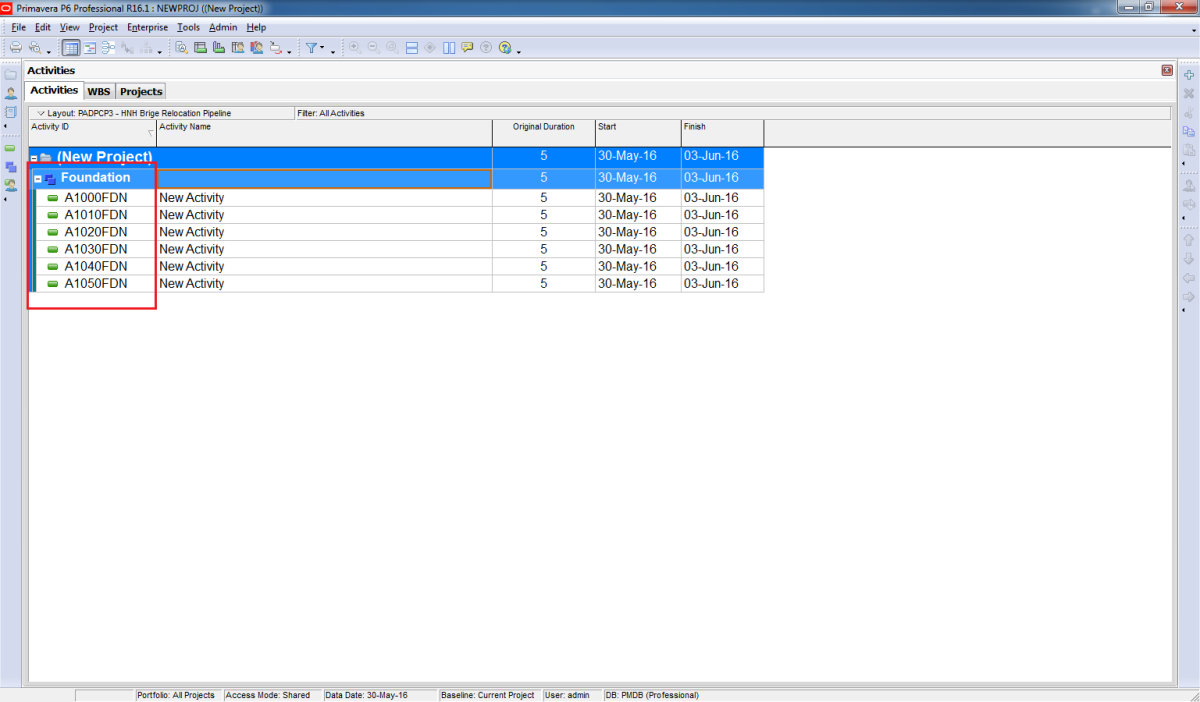
Now you can see there is “FDN” letter in your Activity ID.

Tags:
Continue reading
12847 Hits
0 comments

Critical path: Total Float vs Longest Path


First, let’s take a look at the location of the settings for these two options in Primavera P6 Professional.

Critical Activity Definitions

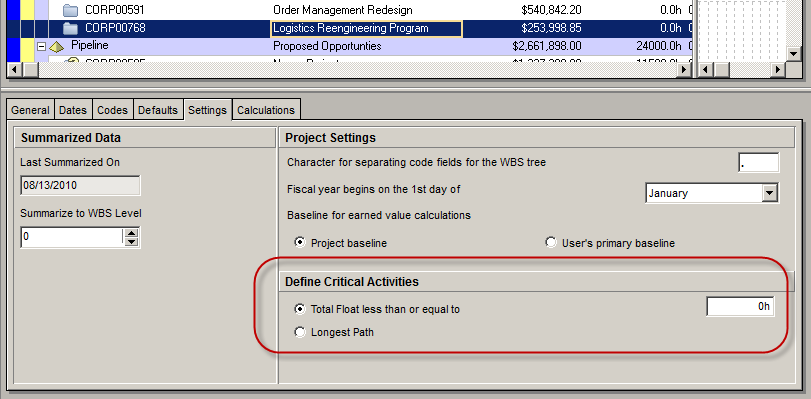
Go to the Projects view of you Primavera P6 Professional application, select a project and then click on the Settings tab in the bottom layout.

TheLongestPath_001

You’ll see the default setting for defining critical activities in the area imaginatively named “Define Critical Activities”, in the lower area of the Settings tab.

This is the default behavior that will be offered to the scheduler when running the Schedule function.

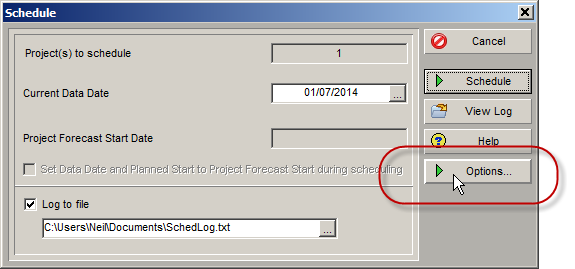
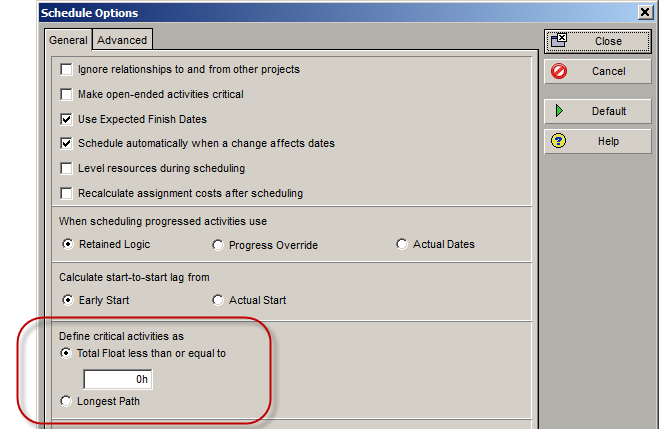
However, this can be overridden at any time in the Schedule Options dialog, accessible from the Schedule dialog (accessed by clicking the F9 key or selecting Schedule from the Tools menu).

TheLongestPath_002

In here you select the Total Float less than or equal to [value in hours] or go with Longest Path.

TheLongestPath_003

Total Float vs. Longest Path

The difference between Total Float and Longest Path can be summed up in the following way. Total Float calculations look at the Total Float for each activity in the network. If its Total Float value is zero, then it will be flagged as a critical activity. However that doesn’t necessarily mean the activity is on the longest path; it just tells us that the activity is critical, and it may be so due to other factors.

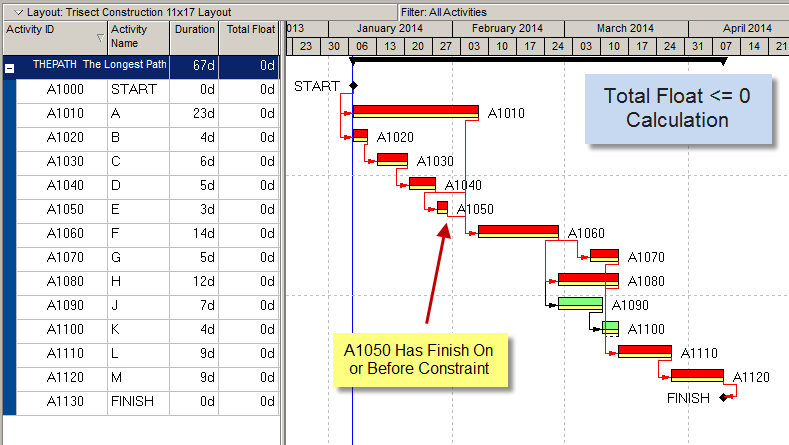
The following example shows how the critical path appears when the Total Float method is used to calculate the Critical Path. Activity A1050 has a ‘Finish On or Before’ constraint that is equal to its planned finish date, so it and its predecessors are showing critical. If they slip, they probably won’t impact the end date of the project, but they will overrun their constraint date; which is why they are showing as critical from a ‘Total Float <= 0’ perspective.

TheLongestPath_004

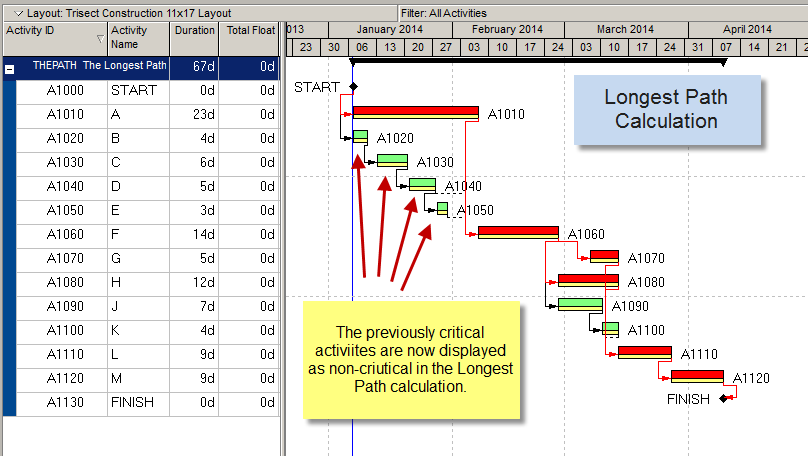
However,  if the Longest Path method of calculation is used these same activities will not appear as critical because there is a constraint somewhere along that path.  They will not in this case affect the end date of the project, so they are not on the longest path.

In this next example you can see the identical project schedule when it is calculated using the Longest Path method.

TheLongestPath_005

Previously critical activities are now showing as non-critical. Interestingly, they still have zero days Total Float, but P6 is ignoring them because they are not part of the longest path through the network.

The Longest Path through the schedule network will only consider activities as critical if they are on a contagious path from the start of the project to the end. Typically this is a single path upon which any activity that slips will impact the end date of the project.

Usage

Schedulers often use the Longest Path method when first developing the schedule. This gives them a clear idea of the activities that are driving the scheduled finish date for the overall project, without concerning themselves with complicating factors such as constraints, resource leveling, path divergence and convergence and other items that come into play when working a large and complex schedule.

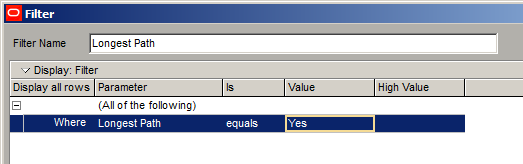
Primavera P6 even has a “Longest Path” Boolean field that allows you to create a filter to see only activities on the longest path.

TheLongestPath_006

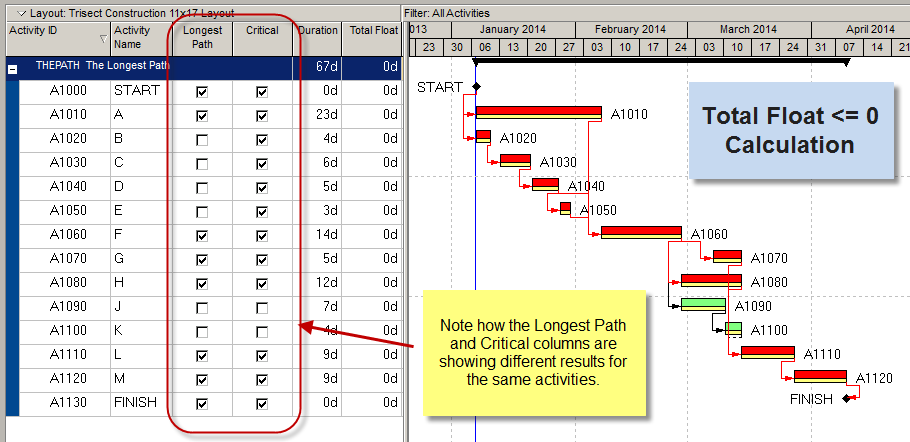
The Critical column and the Longest Path column will hold different values once a calculation of each type has been performed on the schedule at least one time.

TheLongestPath_007

With Primavera P6, you’re not committed to one method or another. At any time during the project lifecycle you can switch from Total Float to Longest Path depending on what you need to see. And at any time you can report on one or the other methods by using the Critical and Longest Path column values.

Source : https://tensix.com/2014/04/the-longest-path/

Continue reading
149191 Hits
0 comments

Primavera become slow – Limitations of SQL Server Express Edition

Primavera become slow – Limitations of SQL Server Express Edition

1
 

A lot of people are using Primavera with SQL Express database. And after using Primavera for a long time, we may realize the software become slow.

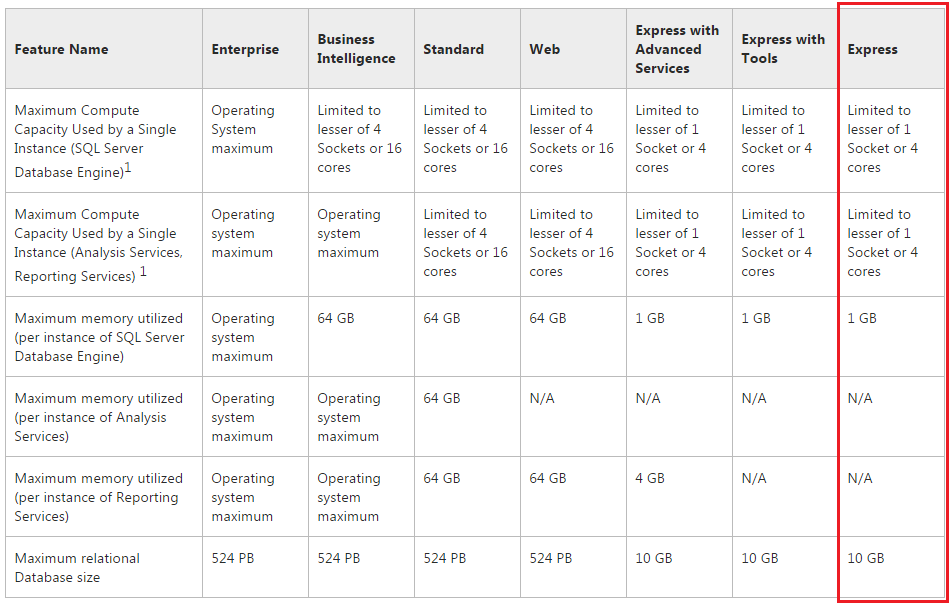
Our database is become bigger and bigger. And the slow performance is may be because of the limitations of SQL Server Express Edition, not because of the CPU or RAM.


1


Based on the table you can see SQL Express only support:

  • 1 CPU
  • 1 GB RAM
  • 10 GB for database size.

No matter how your PC is strong, it only take a few resource from it.

So you may consider buy SQL Standard Edition before upgrade your PC hardware.

Tags:
Continue reading
26998 Hits
0 comments

Automatically update progress in Primavera: The difference between Apply Actuals and Update Progress

2
 

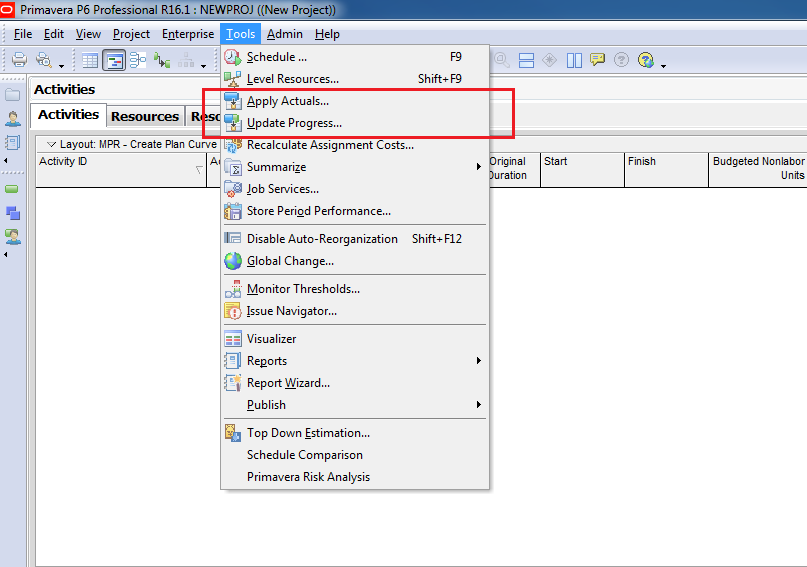
In Primavera, when you need to make a quick update of project (Let’s say everything goes as it’s planned) we have 2 ways of automatically update progress:

  • Apply Actuals

Update Progress


1

Here I will only explain what is the difference between these 2 options.

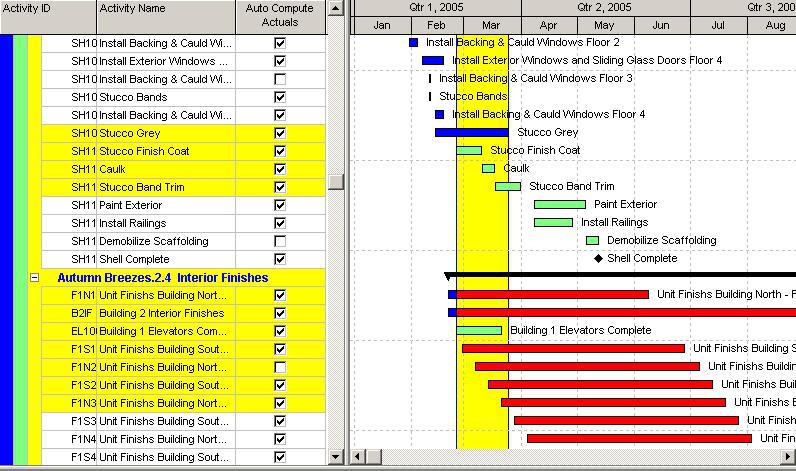
The Apply Actuals function will update any activities with the “Auto Compute Actuals” checkbox marked…

PATTLNK_12212005_160054-cwilkinson-image

…whereas the Update Progress (Progress Spotlight) feature will update activities which fall within the spotlighted region regardless the status of “Auto Compute Actuals” checkbox.

PATTLNK_12212005_155938-cwilkinson-image

And this is the rule when Primavera automatically apply the Actual (in both option):

  • Apply an Actual Start to all Activities that have a Planned Start < Data Date. The Actual Start is set to the Planned Start.
  • Level of Efforts and WBS Summary activites get there dates from other activities.
  • Planned Finish is not changed.
  • Calculates Remaining Duration as the Early Finish-New Data Date.
  • Calculates Actual Duration as Original Duration-Remaining Duration.
  • Calculates Actual Units as Activity % Complete * At Complete Units..
  • If Planned Finish is < Data Date, then an Actual Finish will be applied. The Actual Finish is set to the Planned Finish.
  • Actuals are subtracted from Budgeted values to calculate Remaining values.
Tags:
Continue reading
29506 Hits
0 comments

Categories

Search